3 Best Online Marketing Tools Collections
The 3 Best of Everything for Your Online Business
About the 3 Best Online Marketing Tools Collections
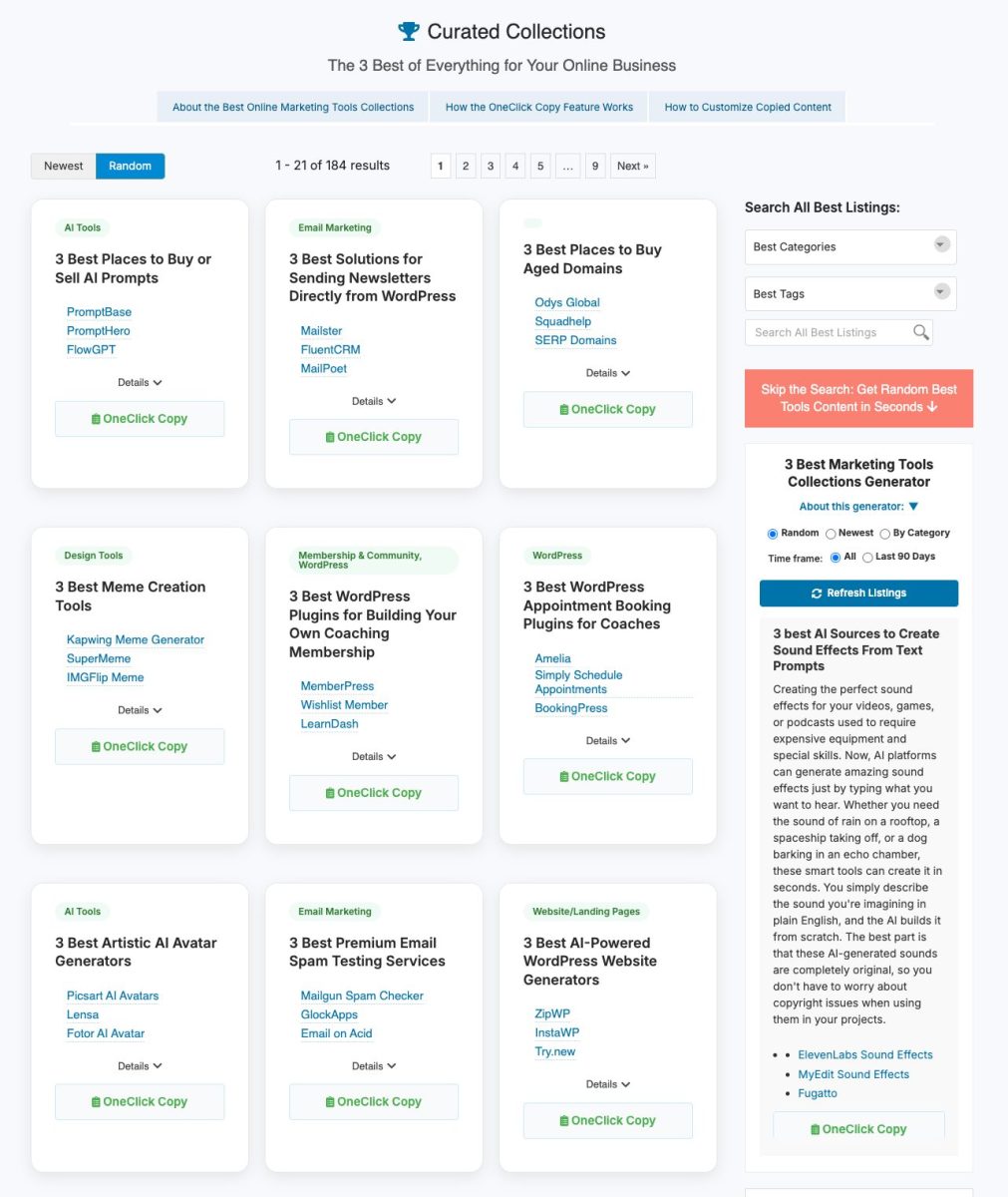
 Tired of scrolling through endless '50 Best Marketing Tools' lists only to feel more confused than when you started? Me too. That's why I created this no-nonsense directory featuring only the TOP 3 tool collections for each specific marketing task.
Each carefully curated collection gives you:
- A clear, descriptive title that tells you exactly what challenge these tools solve
- A concise explanation of what these tools actually do (in human language, not marketing-speak)
- Direct links to the 3 most effective solutions in that category
I've done the hard work of research, so you don't have to waste hours comparing features across dozens of options. Each listing represents time spent on research, watching videos, reading reviews, and often consulting with actual users to identify the truly essential tools that deliver results.
Copy Any Resource with Just One Click
Thanks to sophisticated technology behind the scenes, you can copy any listing you want with a single click, formatted and ready to paste into your blog, newsletter, resource page, or any other content. The links come as standard URLs with the original site link, which you can easily swap for your own affiliate links when appropriate.
Your own audience will appreciate you sharing the collections with them to save them the time and frustration of searching through Google, AI, articles, and videos to find the right tools for their marketing tasks. Just click once on the green "OneClick Copy" button to get the listing in one of four formats (Newsletter, HTML, Plain Text, or Social Media) to instantly save the content to your computer's clipboard. Then paste it wherever you need it.
Perfect for:
- Bloggers
- Coaches
- Membership Content
- Social Media
- YouTube
And more.
Why These Resources are Built to Last
You'll notice something different about the directories on OneClickCurator.com. I don't organize everything by "newest first" or plaster the current year all over every listing. That's intentional.
While everyone else chases the latest shiny tools and trending tactics, I focus on resources that have proven themselves over time. Many of the most effective solutions have been quietly working for years, helping thousands of people get results. But here's the problem: newcomers to any field automatically assume that only the newest options are worth considering.
That's why I load these directories randomly by default. Your next breakthrough might come from a "boring" tool that's been solving problems since 2018, not the flashy newcomer that launched last month. Some of the most reliable, feature-rich solutions are the ones that have had years to mature and build their user base. Of course, if you choose, you can click the "Newest" button to see my most recent additions.
Even if this site had zero OneClick copy features, it would still be valuable as a time-saving research tool. I've done the heavy lifting of filtering through thousands of options, reading reviews, testing tools, and separating the wheat from the chaff. Instead of spending hours comparing features and reading conflicting opinions, you get curated collections that actually work.
The OneClick copy feature just makes it exponentially more useful, turning your research time into instant, actionable content you can use right away.
Remember: proven and reliable often beats new and untested. Don't let "launch year" determine your success.
Quick Content Generator to Speed up Your Curation
Need curated content fast? Be sure to check out my 3 Best Marketing Tools Quick Content Generator. When you need quick content related to these listings (not AI-generated), simply select your options and get instant, copyable content with just one click. You'll find the 3 Best marketing tools generator on the right side of the page under the bright red box.
All of the OneClick content on the full directory pages is available to paid Platinum users to copy and use for your own publications and content. (The home page Random Content Generators are free to email registered users).
Save time, make better choices, and help your audience do the same. Because sometimes, three perfect options are better than twenty mediocre ones.
How the OneClick Copy Feature Works
 My OneClick copy feature saves you valuable time and ensures accuracy when using these tool recommendations across your content. Click on any "OneClick Copy" button to choose from four ready-to-go formats and the content is immediately stored to your computer's clipboard. Then just paste the ready-to-go content wherever you need it.
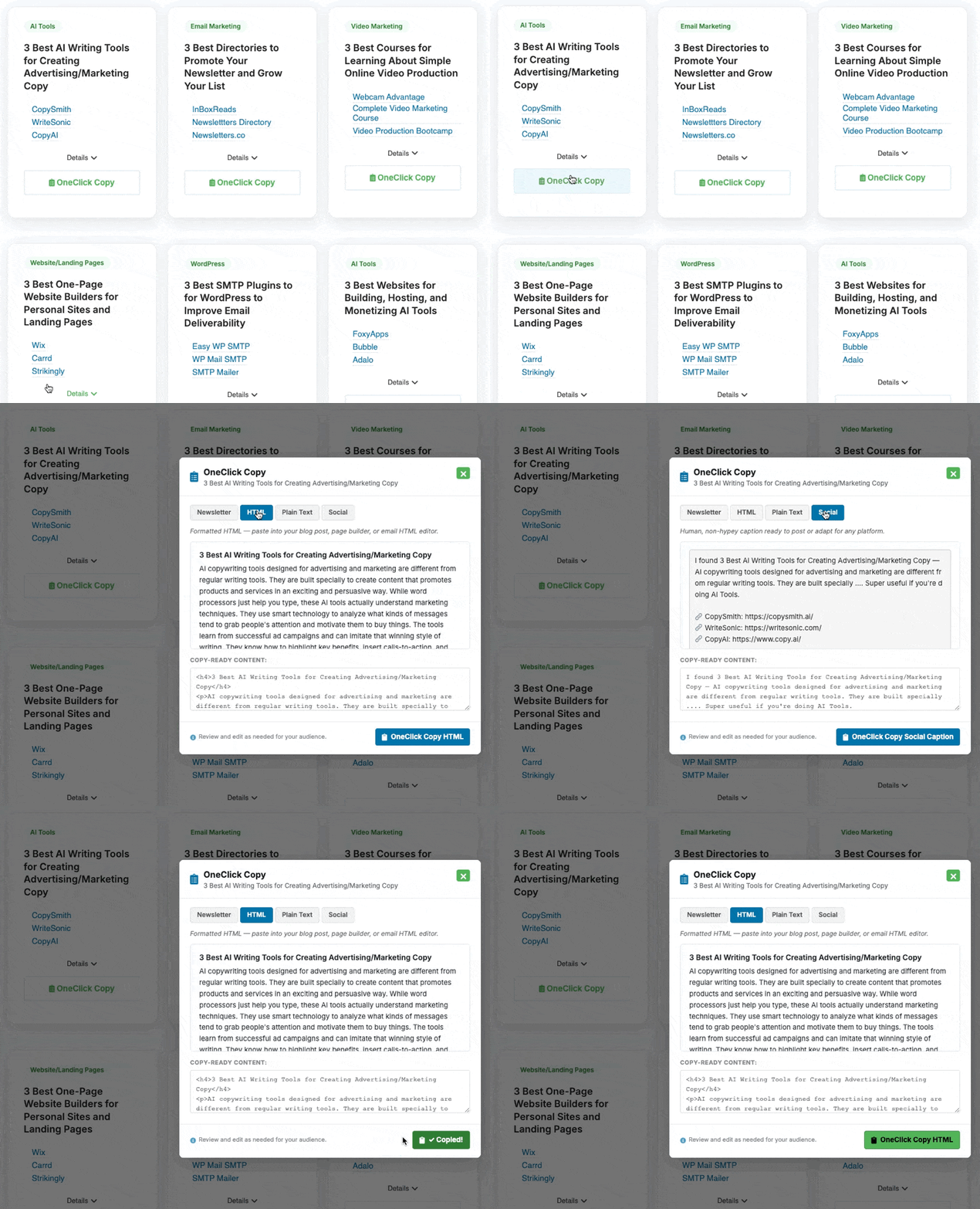
- Four Ready-To-Go Options: Newsletter, HTML, Plain Text, and Social Media
- Complete Formatted Listings: Get the title, description, and all three original tool links in one perfectly formatted package.
- Ready-to-Use Structure: Each listing is designed to work seamlessly in blogs, emails, social media posts, resource pages, and more.
- Customizable Links: Easily replace the standard URLs with your own affiliate links where applicable.
- Immediate Clipboard Access: No highlighting or manual copying needed - one click and the entire listing is ready to paste wherever you need it.
- Quick Content Generator: Need fresh content related to these tools? My 3 Best listing generator creates unique, relevant content based on your selected options—also available with OneClick copying.
Use these curated tool recommendations to enhance your authority, provide genuine value to your audience, and save everyone from the overwhelm of too many choices.
3 Best AI Tools for Competitor Research and Analysis
DetailsUnderstanding what your competitors are doing online is crucial for marketing success. AI-powered competitor research tools help you see which keywords your rivals rank for, what content performs best for them, and how much traffic they get. These insights let you spot opportunities, improve your own strategy, and stay ahead in your market. The right tool can save you hours of manual research while giving you data that would be impossible to gather on your own. Here are three top AI tools that make competitor analysis simple and effective.
3 Best Tools for Creating and Selling Digital Templates
DetailsCreating and selling digital templates has become a popular way to make money online. These templates can include social media graphics, business cards, resumes, or any design that people can customize for their own use. To get started, you need tools that help you design professional-looking templates and platforms where you can sell them to customers. The right combination of design software and marketplace platforms makes it possible to build a steady income from template sales. Here are three essential tools that cover both the creation and selling sides of the digital template business.
3 Best Countdown Timer and Urgency Tools for Marketers
DetailsCountdown timers and urgency tools help marketers create a sense of limited time to encourage faster buying decisions. These tools let you add countdown clocks to your websites, emails, and sales pages that show when special offers or deals will end. When people see time running out, they often feel more motivated to take action right away instead of waiting. I found three popular countdown timer tools that make it easy to add this urgency element to your marketing campaigns and boost your conversion rates.
3 Best Survey and Feedback Collection Tools
DetailsGetting feedback from your customers is one of the most important things you can do for your business. Survey and feedback tools make it easy to ask questions, collect responses, and understand what people really think about your products or services. These tools help you create professional-looking surveys that you can share through email, social media, or your website. The feedback you gather can guide your marketing decisions and help you improve your customer experience. I’ve put together three popular survey tools that make collecting customer feedback simple and effective.
3 Best AI Resume and Bio Generators
DetailsCreating a strong resume and professional bio is essential for building your personal brand and marketing yourself online. These AI-powered tools help you write compelling resumes and bios that stand out to employers and potential clients. Whether you’re job hunting, freelancing, or building your professional presence on social media, having well-written content about your skills and experience makes a big difference. I’ve put together three AI generators that can help you create professional resumes and bios quickly and easily.
3 Best Tools for Building a Paid Newsletter
DetailsPaid newsletters have become a popular way to build an audience and earn money from your writing. These platforms let you create subscription-based content where readers pay monthly or yearly fees to access your newsletters. They handle the technical side of things like payment processing, subscriber management, and email delivery, so you can focus on creating great content. Most of these tools also include features to help you grow your subscriber base and track how well your newsletters are performing. Here are three of the best platforms for starting your own paid newsletter.
3 Best Heatmap and Visitor Behavior Tools
DetailsUnderstanding how visitors interact with your website is crucial for improving your marketing results. Heatmap and visitor behavior tools show you exactly where people click, scroll, and spend time on your pages. This information helps you identify what’s working and what needs to be fixed to get more conversions. You can see which buttons get ignored, where visitors get confused, and how far down they scroll before leaving. I’ve put together three reliable tools that make tracking visitor behavior simple and affordable for any business.
3 Best Drag-and-Drop Email Template Builders
DetailsCreating professional email templates doesn’t have to be complicated or require coding skills. Drag-and-drop email builders let you design beautiful newsletters and marketing emails by simply moving elements around on your screen. These tools are perfect for small businesses, marketers, and anyone who wants to create eye-catching emails that get results. You can add images, text, buttons, and other features without any technical knowledge. I’ve put together three of the best drag-and-drop email template builders that make email design simple and effective.
3 Best Tools for Finding Trending Topics and Content Ideas
DetailsFinding trending topics and fresh content ideas is one of the biggest challenges in online marketing. You need to know what people are talking about and searching for right now to create content that actually gets attention. The right tools can help you spot popular topics before they peak and discover what your audience wants to read about. I’ve put together three tools that make finding trending topics and content ideas much easier. Each one offers a different way to track what’s popular and help you stay ahead of the curve.
3 Best Marketplace Platforms for Selling AI Prompts
DetailsAI prompts have become a valuable digital product that people want to buy and sell online. If you create effective prompts for ChatGPT, Midjourney, or other AI tools, you can turn them into a income stream by selling them on marketplace platforms. These platforms let you reach customers who need quality prompts but don’t want to spend time creating their own. For marketers and content creators, selling AI prompts can be an easy way to monetize your expertise with artificial intelligence tools. Here are three popular platforms where you can list and sell your AI prompts to buyers around the world.
3 Best Tools for Creating Online Quizzes and Assessments
DetailsOnline quizzes and assessments are powerful marketing tools that help businesses engage their audience and generate leads. When people take quizzes, they’re more likely to share their contact information in exchange for personalized results. These interactive tools also keep visitors on your website longer and encourage social sharing, which brings in more potential customers. I’ve put together three reliable platforms that make it easy to create professional quizzes without needing technical skills. Each tool offers different features and pricing options to fit various business needs.
3 Best Platforms for Selling Digital Courses Without a Website
DetailsCreating and selling digital courses online doesn’t require building your own website from scratch. Several platforms let you upload your course content, set your prices, and start selling right away. These all-in-one solutions handle the technical stuff like payment processing, student management, and course delivery so you can focus on creating great content. They also include built-in marketing features to help you promote your courses and reach more students. Here are three reliable platforms that make it easy to get your digital course business up and running.
3 Best AI Tools for Podcast Production and Editing
DetailsCreating quality podcasts used to require expensive equipment and advanced editing skills. Now AI-powered tools make podcast production much easier for beginners and experienced creators alike. These tools can automatically remove background noise, edit out filler words, and even help with recording quality. For marketers, podcasts offer a great way to build an audience and share expertise with potential customers. Good production quality helps your podcast sound professional and keeps listeners engaged. I’ve found three AI tools that make podcast creation simpler and more affordable.
3 Best Screen Recording Apps for Marketers
DetailsScreen recording apps help marketers create videos to explain products, teach customers how to use services, and share ideas with their teams. I use these tools to make tutorial videos, record software demos, and create content for social media and websites. They let you capture what’s happening on your computer screen while you talk, making it easy to show instead of just tell. Whether you need something simple for quick videos or more advanced features for professional content, the right screen recording app can save you time and help you connect better with your audience. Here are three solid options that work well for different marketing needs.
3 Best AI Transcription Services
DetailsAI transcription services automatically turn your audio and video content into written text. This saves you hours of manual typing and makes your content more accessible to your audience. For marketers, these tools help create blog posts from podcasts, add captions to videos, and turn webinars into written content you can repurpose across different platforms. Having accurate transcripts also helps with SEO since search engines can better understand your audio and video content. Here are three reliable AI transcription services that can streamline your content creation process.
3 Best AI Grammar and Proofreading Tools
DetailsGood writing matters for marketing success. Whether you’re creating social media posts, email campaigns, or website copy, grammar mistakes can hurt your credibility and turn away potential customers. AI grammar and proofreading tools help catch errors you might miss and improve your writing quality. These tools check spelling, grammar, and style while offering suggestions to make your content clearer and more professional. I’ve put together three of the best AI grammar tools that can help marketers create better content and communicate more effectively with their audience.
3 Best Canva Alternatives for Graphic Design
DetailsCanva is popular for creating graphics, but it’s not your only option. These design tools help you make social media posts, ads, logos, and other marketing materials without needing advanced design skills. Each one offers different features and pricing, so you can find what works best for your needs and budget. Whether you’re running a small business or managing social media accounts, having the right design tool makes creating professional-looking graphics much easier. Here are three solid alternatives that can handle most of your graphic design needs.
3 Best AI Meeting Summary and Note-Taking Apps
DetailsAI meeting summary and note-taking apps automatically record your calls and turn them into written notes. These tools are helpful for marketers who spend time on client calls, team meetings, and strategy sessions. Instead of trying to write everything down while talking, the AI does it for you. You get clean summaries and action items without missing important details during your conversation. This saves time and helps you focus on the actual meeting instead of scrambling to take notes. Here are three popular options that can streamline your meeting workflow.
3 Best Stock Video Footage Sites for Content Creators
DetailsVideo content drives engagement and helps brands connect with their audience across social media platforms. Finding the right stock footage can make your marketing videos look professional without breaking your budget. Good stock video sites give you access to high-quality clips that save time and money compared to filming everything yourself. I’ve put together three reliable platforms that offer different pricing options and video styles to help you create compelling content for your marketing campaigns.
3 Best AI Tools for Repurposing Long-Form Content
DetailsCreating short clips and social media posts from your long-form content takes a lot of time and effort. AI tools can now handle this process for you, turning your podcasts, videos, and blog posts into multiple pieces of content automatically. These tools help you reach more people across different platforms without starting from scratch each time. I’ve put together three AI-powered options that make content repurposing much easier for marketers and content creators.
3 Best Online Business Card and Digital Profile Tools
DetailsDigital business cards and online profile tools are changing how people share their contact information and market themselves online. Instead of carrying paper cards that can get lost or damaged, these platforms let you create digital profiles that include your contact details, social media links, and professional information. You can share them instantly through QR codes, text messages, or email links. This makes networking easier and helps you build your personal brand while staying connected with new contacts. Here are three popular tools that make creating and sharing digital business cards simple and effective.
Search All Best Listings:
Become a Platinum Member and Get Access
to Over 4,000 OneClick Copy Resources
Normally, there would be a gigantic directory here of hundreds of marketing resources that you can quickly copy for your own use with my OneClick Copy feature. Free members have unlimited access to the 9 random content generators — a genuinely useful starting point. But "random" is the key word. You have no control over what comes up, what category it's from, or how recent it is. Our Platinum Members have access to this directory and eight others that are fully searchable, and organized by category, keyword, and date. Everything is formatted and ready to paste. Click Here to learn how.